
Authentication API
This document explains how to use Authentication APIs. Authentication APIs use HTTP POST protocol and send and receive messages in JSON format.
Endpoint
Real Server : https://auth.vixco.net/v2
Test Server : https://test-auth.vixco.net/v2
API References
Authenticate
Log in using your ID and password.
User type (store, employee, platform, customer, root)
User ID
User password
JWT
Returns a JWT (JSON Web Token) for authentication
Missing parameters
User not found
userTypeis ignored. Currently it is not used.You can authenticate through
idandpassword.If there is a
tokenvalue, the token validity period can be extended.If successful, you get a new JWT
token. It also receives basic user information, such as username,userId,telNo, andemail.
Example
Log in using your VP (Verifiable Presentation).
Put the VP body in
vp.In case of the application's own login,
requestIdis not needed.requestIdis required for web site login. When the web site shows the QR code through the browser, the user application reads this value, puts it in therequetId, and calls this API to log in to the web site.If successful, you get a new JWT
token. It also receives basic user information, such as username,userId,telNo, andemail.
Example
The following auth-user-by-app, cancel-auth-user-by-app, and auth-user-result-by-app are provided for web site login. These APIs are used by the web server script.
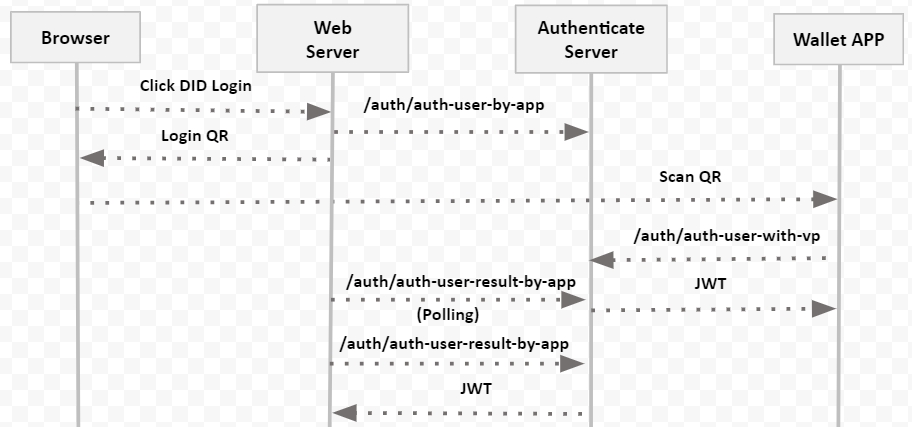
Request DID login.
requestIdis an identifier that identifies the web site. In general, you can use the site URL + "?".waitTimeis the maximum waiting time for login.If successful, new
requestIdis issued. This value should be used to check if a user is logged in by the user application.
Example
Cancel the authentication request.
requestIdis the id you want to cancel.waitTimeis ignored.
Example
Check whether the login was successful.
requestIdis the ID that checks the login success response.waitTimeis ignored.If successful, you get a new JWT
token. It also receives basic user information, such as username,userId,telNo, andemail.If there is no request or the request time is old, a 400 error occurs.
If you're waiting for a response from your app, you'll get a 401 error.
Example
Never requested:
Waiting for response from user app:
Log in normally:
DID (Decentralized Identifier)
Create your DID.
aliasis an alias for identifying a DID.Use the
addressandsecretKeythat came out when you create the address to authenticate yourself.
Example
Create your VCs (Verifiable Credential).
Because this is the credentials used by this system, the JWT authenticated by /auth/auth-user in advance is required.
holderis your issued DID.issueris the issuer DID provided by this authentication system.Provides additional information to
userInfoin key/value format.If successful, you will get your VC.
Example
Verify the VC.
The
bodyof the request has the VC.If successful,
verifiedis true.
Example
Create your VP (Verifiable Presentation).
holderis your DID.verifieris the verifier DID provided by this authentication system.credentialscontains a list of VCs.If succesful, your VP is created.
Example
Verify the VP
The
bodyof the request has the VP.If successful,
verifiedis true.
Example
List issuers and verifiers.
Example
Examples
Last updated